How Live Streaming Actually Works
Live streaming basics: how codecs, protocols, and the tech behind your screen actually work.

You open your phone at 7:30 PM. The IPL final is live. Kohli is on strike. A huge audience watches the same ball, the same six, and the same replay on everything from budget phones to giant TVs.
No download bar. No “please wait.” It just plays.
That smooth moment hides a small engineering miracle. Two ideas make it possible: codecs, which shrink video, and protocols, which move it. Let’s unpack both without turning this into a networking textbook.
1. A Protocol Is a Rulebook
Picture a cricket commentary box. One commentator describes the shot, another adds context, and the producer cuts to a replay. Nobody talks over the wrong moment because everyone follows an agreed process.
A network protocol is that process for machines. It defines:
- how a connection starts and ends
- how data is divided and ordered
- what happens when something goes missing
- how quickly the sender should keep moving
You already use protocols constantly. HTTP fetches web content. TCP prioritizes reliable delivery. UDP prioritizes speed. Live video needs rules that balance both—because a perfect replay arriving thirty seconds late is not very live.
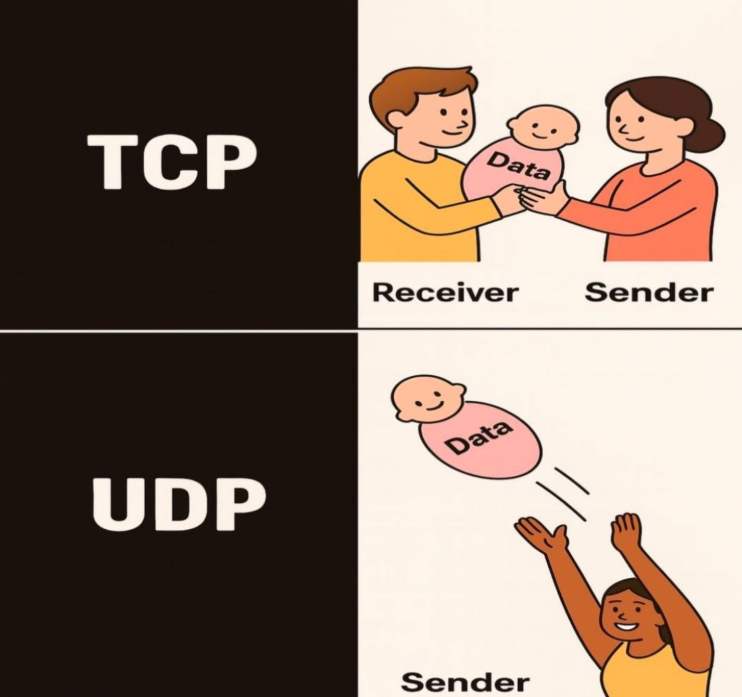
TCP is a Certified Letter: Every single word is tracked. If a page goes missing, the post office stops everything and resends it until the whole letter arrives perfectly—even if it takes longer. (Best for bank transfers or file downloads)
UDP is a Live Walkie-Talkie: You press the button and talk. If static cuts out half a second of your voice, you don’t pause the conversation to replay the lost syllable—you just keep talking in real time. (Best for live calls, gaming, and instant sports feeds)
2. Codec vs. Protocol
This is the one distinction worth remembering:
Codec    = how video is compressed
Protocol = how video is delivered
Imagine broadcasting a WWE match. The codec packs enormous camera feeds into something your phone can decode. The protocol gets that compressed stream from the arena, through servers and networks, to your screen.
Neither works alone. A tiny compressed file that never gets delivered is useless. A brilliant delivery network cannot efficiently move raw stadium footage that weighs several gigabytes per minute.
3. Meet the Codecs
A codec—short for encoder/decoder—compresses video before transmission and reconstructs it on your device.
Video is repetitive. In a wide cricket shot, the pitch and most of the crowd barely change between frames. A codec stores the important changes instead of describing every pixel from scratch.
| Codec | Why it matters |
|---|---|
| H.264 / AVC | The dependable default. Almost every device can play it. |
| H.265 / HEVC | Better compression for 4K and HDR, but licensing complicates support. |
| VP9 | Google’s royalty-free option, widely used by YouTube. |
| AV1 | Newer and highly efficient, though encoding it requires more computing power. |
The broadcaster encodes the video once; every viewer’s device decodes it continuously. If your device does not understand the codec, it cannot display the stream.
4. Four Streaming Protocols
HLS slices video into small chunks and publishes a playlist telling your player where they are. It scales well and works almost everywhere, but the chunking adds delay.
DASH follows a similar chunk-and-playlist model without being tied to Apple. It is common in large web video platforms.
RTMP is old but stubbornly useful. It is still commonly used to push a live feed from broadcasting software to a streaming platform.
WebRTC targets truly real-time communication. It is excellent for video calls and interactive experiences, but harder to scale to enormous sports audiences.
Every choice trades something: speed, reliability, compatibility, or scale.
5. From Stadium to Screen
Here is the whole trip:
- Capture: cameras record the match.
- Encode: a codec compresses the video in real time.
- Ingest: the production system sends the stream to the platform.
- Package: HLS or DASH divides it into playable chunks.
- Distribute: content delivery networks copy those chunks to servers near viewers.
- Play: your phone downloads, decodes, and displays each chunk while requesting the next one.
That fifth step matters enormously. One server cannot handle every cricket fan refreshing at once. A CDN spreads the pressure across many locations, so viewers request video from a nearby edge server instead of one overwhelmed machine.
6. Why Live Video Still Buffers
Netflix can encode a film carefully, store it, and serve the same result forever. Live video gets no second attempt.
- The encoder must work in real time.
- Viewership can spike after a wicket or title change.
- Your connection can drop as a train enters a tunnel.
- Lower latency leaves less buffered video available to hide problems.
This is why players use adaptive bitrate streaming. When your connection weakens, the player quietly drops from 1080p to 720p or 480p. When the network recovers, quality climbs again. A slightly softer picture is better than missing the winning shot behind a spinner.
The Bottom Line
Codecs make live video small enough to move. Protocols decide how it moves. CDNs make sure millions of people can request it at once.
So the next time a six lands in the stands—or a wrestler hits a finisher—remember what happens before you see it: cameras capture it, a codec compresses it, a protocol slices it, servers race it across the internet, and your phone rebuilds it in real time.
May your stream stay sharp and your buffer never spin during the final over. 🏏